> For the complete documentation index, see [llms.txt](https://docs.gearplug.io/llms.txt). Markdown versions of documentation pages are available by appending `.md` to page URLs; this page is available as [Markdown](https://docs.gearplug.io/configura-tus-conexiones/monetiza/crea-tu-conexion-a-monetiza.md).

# Crea tu conexión a Monetiza

{% hint style="info" %}
**Conexión Oauth**: Instala nuestra aplicación en tu cuenta para que podamos conectarlo a otras apps.
{% endhint %}

Para usar Monetiza en GearPlug, necesitarás un API Token asociado a tu cuenta de Monetiza. Debajo, te enseñamos cómo conseguirlo:

1. **Ingresa a** [**https://my.monetiza.app/api\_tokens**](https://my.monetiza.app/api_tokens) y haz clic en “Crea un API token”.

<figure><img src="https://lh6.googleusercontent.com/Ua-2HHYs0dwpedCV__XCXJYsgj4JfmMytwQsfaQq7T4-8H1IEocKT0gjoDIzZ99AYU_tVL6a66Y-o96ewuTCA2aX-Tj7RRxk7Y4ak_AWDjKM_oT8Lepa6a5Lx2Diw4sRPdTmTH7tWqIYn6UcHN5_KA" alt=""><figcaption></figcaption></figure>

2. **Asigna un nombre** a tu API Token y haz clic en “Crear”.

<figure><img src="https://lh3.googleusercontent.com/UQZWWvRq8mZgcgO03mCakOrGQuRDhrwGy6q80qfZdS5vJ045d8n-fnDVX0CqOftOPS4oXPrhnZGvnCL9oXD3ogm7YCEGCZMhn82Yed2bqni3GHM4Mjrr2tE5YUJ6madk6GlfZZ9it2E86MUrZSDRhw" alt=""><figcaption></figcaption></figure>

3. **Copia tu token** recién creado haciendo clic debajo de “Token”.

<figure><img src="https://lh4.googleusercontent.com/cgGYDQVZy-TAp5F1UuIs_ZhsWQ0e7dJIuBc9onBDJibiRVIc21qVe7tTcwVHQDwvn6_Ra3wAmDt22p0KtBhIzDcuyd6_BG-GGY0paoPGpHWCyTKRJI76K7W7L0-VXaNG8nJ3ClxoyywXSMtiUpxRTQ" alt=""><figcaption></figcaption></figure>

### Configura el acceso

1. **Dirígete a “Plugs”** en la parte superior de tu interfaz de GearPlug.

<figure><img src="https://lh7-us.googleusercontent.com/BjRSVSqtZvPF3IxJO8RIl-KMtv5KbgjDX66RPLWjhAk3Rlb34L3PK-CUFs4pU5J0EtKruMWXPufKRCqmQgQ19itMDax8nhf7wRRUD83ToIvcRQVcZvejsiwO-mbsk8_tfKzAjArf6T_IqNMrXCJMwA" alt=""><figcaption></figcaption></figure>

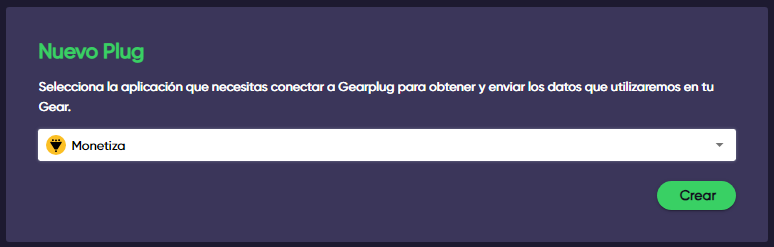
2. **Selecciona Monetiza** en el menú desplegable debajo de “Nuevo Plug” y haz clic en “Crear”.

<figure><img src="/files/kphTaRR1YfGdwJDjjwrl" alt=""><figcaption></figcaption></figure>

3. **Pega el token API** que copiamos en los pasos anteriores y haz clic en “Crear” para finalizar la configuración.

<figure><img src="/files/R2TspBwNgTIRkFEJVPxU" alt=""><figcaption></figcaption></figure>